
Gantt
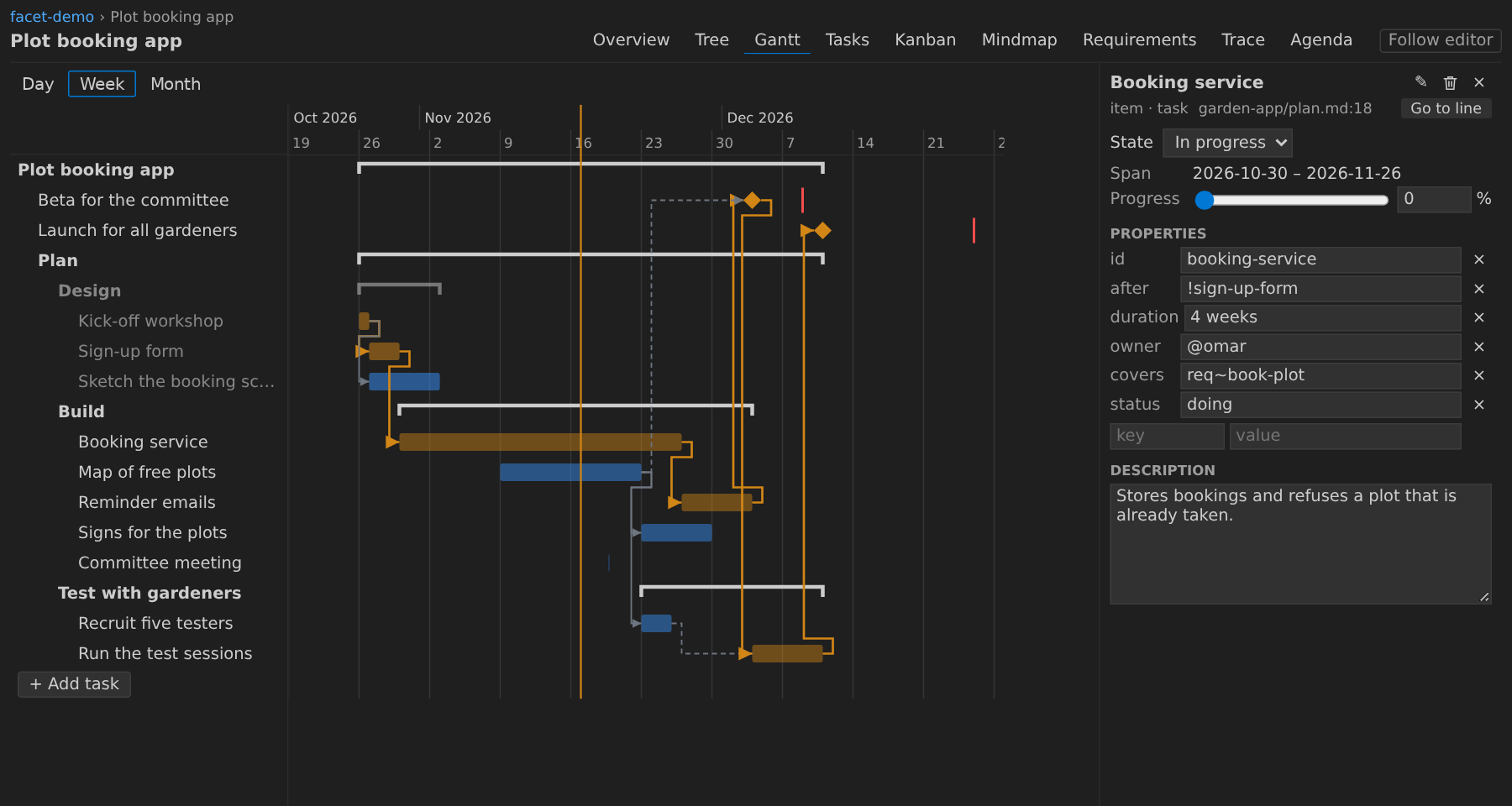
The Gantt draws the dated work of a file or folder on a time axis: tasks
and events as bars, milestones as diamonds, after:: dependencies as
arrows.
Open it
Section titled “Open it”Show a file or folder in the Facet tab (side bar, or Facet: Open View to
the Side on a Markdown file) and pick Gantt in the view switcher. It
is offered when something below has dates: a start::, end::,
duration::, after:: or due::, or a repeating task. On other files you
can still pick it from More….
What it shows
Section titled “What it shows”- One row per node, in document order, indented like the outline. Rows without dates of their own are kept when something below them has dates.
- Bars for tasks and events. A parent with its own start and end is a box that holds its children. A parent without dates is a roll-up bar spanning its children.
- Diamonds for milestones.
- Arrows for
after::dependencies. - The critical path: the chain of dependencies and anchors that sets the end of what is shown. Its bars and arrows are highlighted.
- Late work in red: a node whose computed end passes its
due::. - Repeating tasks have no bar. Their next occurrence is shown instead.
- Unscheduled tasks (a duration but nothing to start from) go to a lane at the bottom. Lint says why in the Problems panel.
- Today as a vertical line.
- Branches brought in by
include:are marked “included”.
The Day, Week and Month buttons change the scale. Facet picks one that fits the dates when the view opens. The day scale shades weekends.
How dates are computed (fixed dates, after::, roll-up, boxes) is
described in Dates and scheduling.
Change dates
Section titled “Change dates”Drag with the mouse, in whole days:
- drag a bar to move it;
- drag its left edge to change its start (the end stays);
- drag its right edge to change its end (the start stays);
- drag a milestone to move it.
Press Escape during a drag to cancel it.
Facet writes the new dates in the form the line already uses. Moving
shifts the written start:: and end::, or adds start:: when neither
is written. Dragging the end rewrites end::, else duration::, else adds
end::. For example, moving this task two days later:
- [ ] Print flyers [after:: !hall] [duration:: 3 days]adds a start date. A written start:: wins over after::, so the
dependency stays in the text but no longer drives the start:
- [ ] Print flyers [after:: !hall] [duration:: 3 days] [start:: 2027-05-07]Some rows cannot be dragged:
- roll-up bars: their dates come from their children;
- repeating tasks: they have no bar;
- milestones placed only by their
due::: moving them would leave the deadline behind; - milestones cannot be resized, only moved.
Add and delete
Section titled “Add and delete”- Hover a row to see a (+) at the day under the pointer. On a heading
or file row it adds a task starting that day inside it; on an item row,
a task after it. On an undated task, (+) gives it a
start::on that day instead. - + Add task at the bottom opens the composer. The new task starts
today:
- [ ] title [start:: <today>]. - Select a row and press Delete (or Backspace) to delete the node with everything below it. A node with children asks first.
Select and navigate
Section titled “Select and navigate”Click a bar or a row label to select it: the details pane shows its properties, computed dates and problems, and lets you edit them. Ctrl+click (Cmd+click on macOS), or “Go to line” in the details pane, opens its line in the text editor. With the keyboard, Tab reaches the rows, Enter selects and Delete deletes.